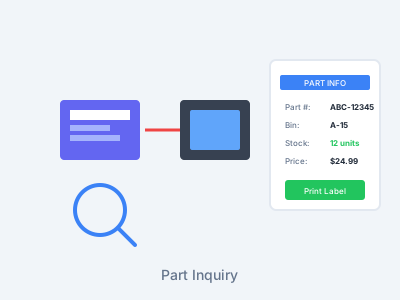
Part Inquiry
Instantly look up any part right from your scanner. See stocking levels, bin locations, and print new barcode labels without walking back to a computer.
The Problem
- Walking to computer to look up part info
- Not knowing where a part belongs
- Old part numbers don't match new ones
- Missing or damaged barcode labels
- No quick way to check stock levels
Our Solution
- Scan and see all info instantly on device
- Shows bin location - put parts where they belong
- Works with old AND new part numbers
- Print new barcode labels from scanner
- Real-time stock levels at your fingertips
Everything You Need at Your Fingertips
Instant Lookup
Scan any 1D barcode, 2D barcode, or QR code and instantly see all inventory information. Works with every OEM — automotive, powersports, and heavy-duty.
Bin Location Display
Immediately see where any part belongs. No more guessing or walking to a computer to look it up.
Print Labels On-Demand
Print a new barcode label directly from your scanner. Replace damaged or missing labels instantly.
Old & New Part Numbers
Scan either the old or new part number - the system recognizes both and shows complete inventory info.
Real-Time Stock Levels
See current quantity on hand, on order, and committed - all updated in real-time from your DMS.
Complete Part Details
View description, cost, list price, source, and all other part information stored in your DMS.
Add to Lookup
Map any barcode to any DMS part number. Scan a UPC, tire barcode, or accessory — link it to your dealer part number once and it works everywhere, forever.
How Part Inquiry Works
Scan the Part
Scan any barcode - works with old part numbers, new part numbers, or existing bin labels.
View Information
Instantly see bin location, stock levels, pricing, and all part details on your scanner screen.
Take Action
Put the part in its correct bin, or print a new label if needed - all without leaving the aisle.
Stay Organized
Maintain perfect inventory control by always knowing where parts belong and what's in stock.
Work Smarter, Not Harder
All part info available right in the aisle
Old and new part numbers both work
Replace missing labels on the spot
When Part Inquiry Saves the Day
Find Where Parts Belong
Found a part out of place? Scan it to instantly see the correct bin location. Put it back where it belongs without guessing or walking to a computer.
Superseded Part Numbers
Customer has an old part number? Scan it and the system shows you the current part number, stock levels, and location - even if the number changed years ago.
Replace Damaged Labels
Label torn, faded, or missing? Scan the part or bin, then print a fresh new label right from your scanner. No trip to the parts counter needed.
Quick Stock Checks
Need to know if you have a part in stock? Scan it right on the shelf to see current quantity, what's on order, and what's committed to other jobs.
Map Any Barcode to Your DMS
Scan a UPC, tire barcode, or accessory that doesn't match your DMS? Add to Lookup lets you create a permanent cross-reference in seconds. Works for tires, hats, shirts, aftermarket parts — anything you inventory.
Smart Barcode Translation
Some competitors market static lookup tables as "barcode intelligence." ScanIt Parts delivers the real thing — dynamic, cloud-synced barcode mapping that works across all your scanners instantly.
Cloud-Synced
Create a barcode mapping on one scanner and it's instantly available on every scanner in your dealership. No manual sync or cradle docking.
Dealer-Customizable
Your mappings are unique to your dealership. Map UPCs, tire codes, case barcodes, and aftermarket parts to your exact DMS part numbers.
Auto-Pull for AC Delco & Motorcraft
Daily automatic data pulls from GM and Ford ensure AC Delco and Motorcraft barcodes always scan correctly. No setup required.
Ready to Put Part Information at Your Fingertips?
See how Part Inquiry can help your team work faster and maintain better inventory control.
Already using ScanIt Parts? The Academy has a step-by-step guide to looking up a part on the scanner.